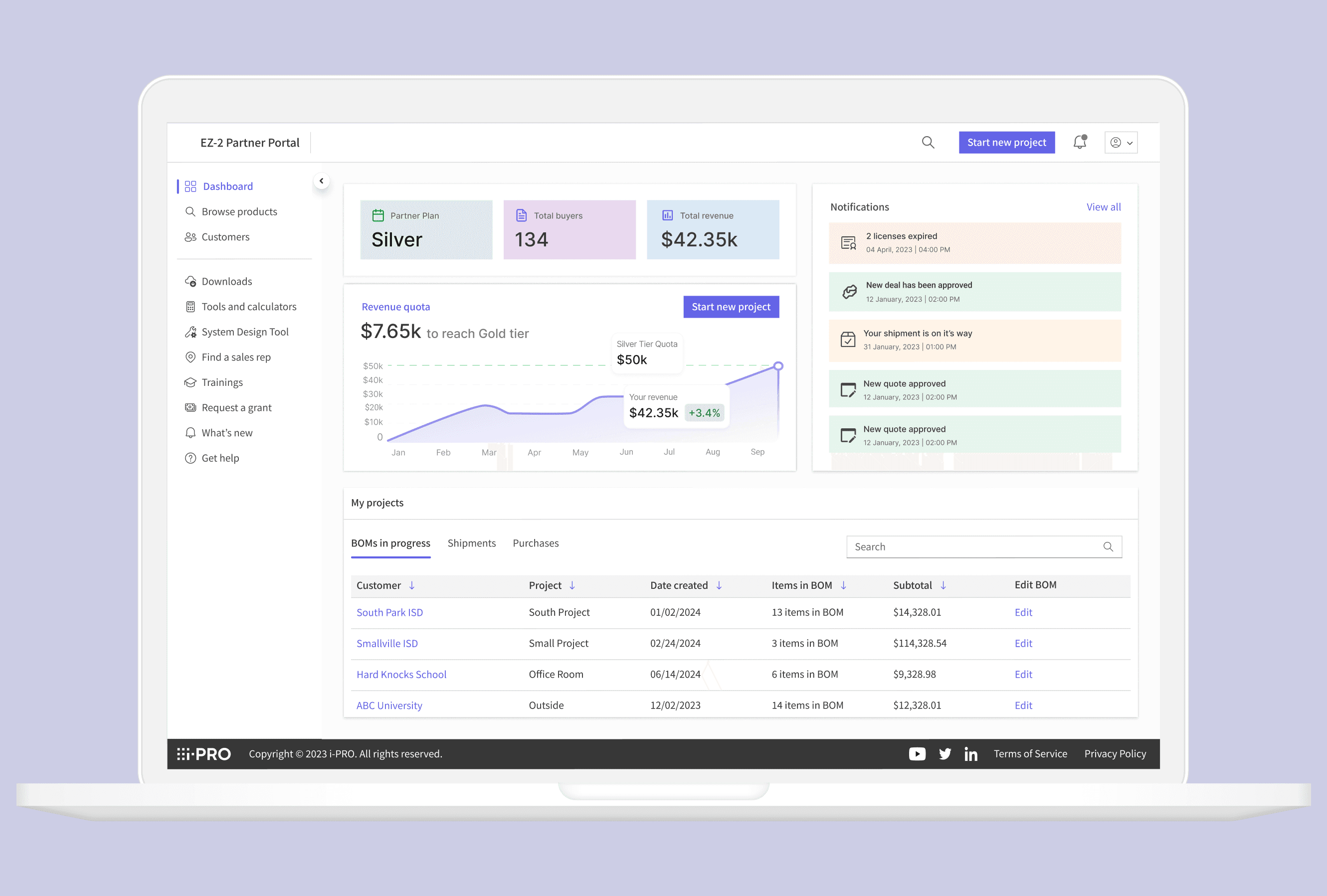
The new dashboard and real-quoting system
IMPACT
Reduced quote creation time from 2 hours to under 10 minutes
30% faster product
search
40% fewer errors
Primary focus
Starting with the business
The project began with three critical goals for partner channel growth:
Increase engagement: partners were not returning to the portal regularly enough to make it a core business tool.
Drive web traffic: the portal was not serving as the primary workflow hub it was intended to be.
Improve partner relations: satisfaction was declining, and partners relied on customer support for tasks the portal should have handled itself.
Reframing the question
The real problem was simpler: partners avoided the portal because it didn’t match their daily work, and they couldn’t trust it to get their jobs done.
While the business struggled with low engagement, traffic, and satisfaction, the real issue was that the portal wasn’t reliable for customer-facing tasks. Research kept highlighting one key workflow: quoting.
Three main factors caused this problem, and all of them came down to trust:
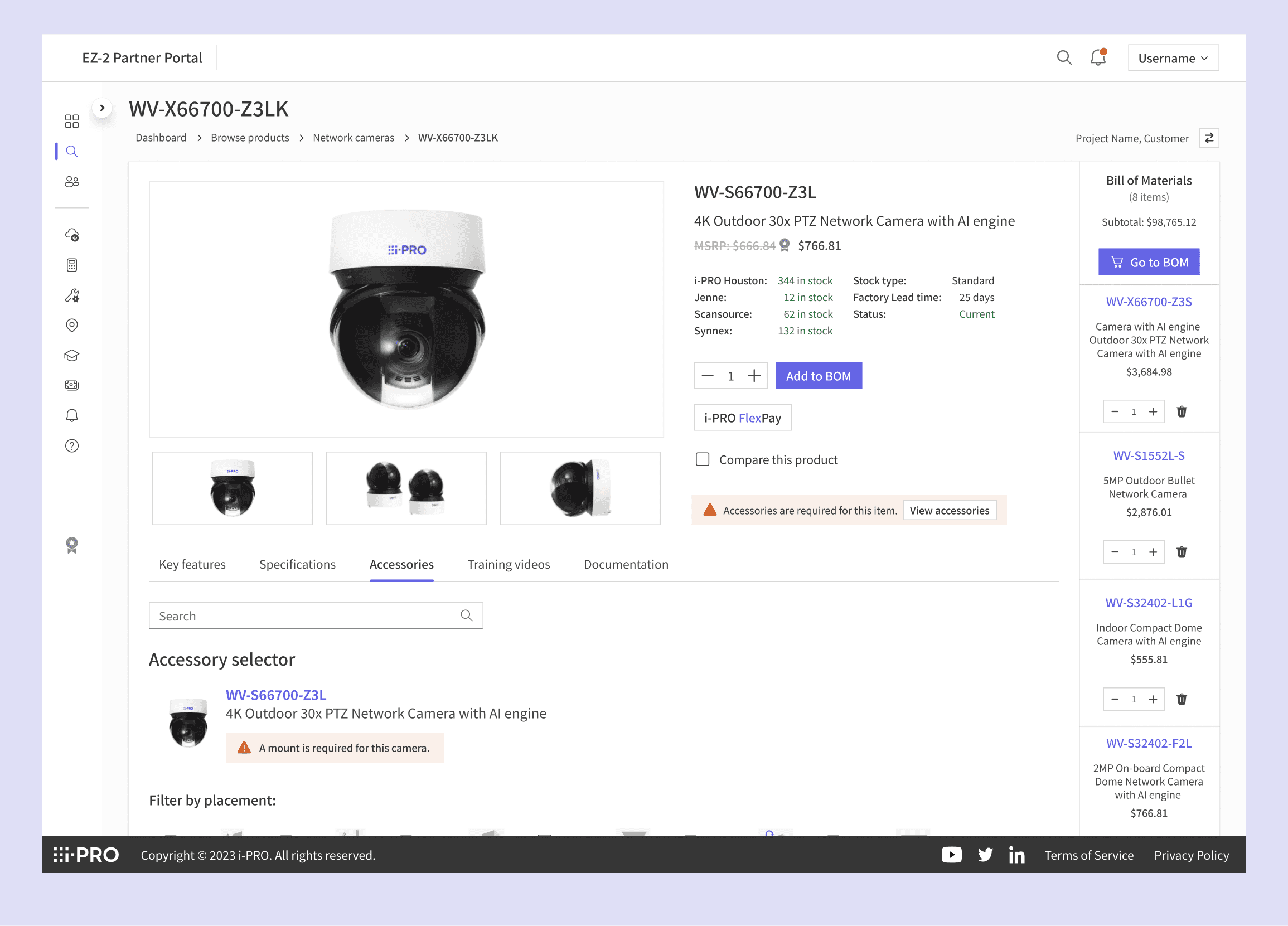
Scattered product information: finding the right accessories and compatible parts required using external catalogs disrupts the quoting process.
Outdated pricing and inventory: partners could not trust the portal's data and had to verify pricing with customer support before sending quotes.
Hidden sales tier and reward progress: partners could not see how quotes affected their status or rewards, limiting the portal's usefulness for commercial decisions.
Before my envolvement
Legacy partner portal homepage


External product line-up catalog
Bridging the solution
This made the next step clear: rebuild the quoting process inside the portal as a trusted self-service system. Partners should be able to search for, build, and finalize a quote in one place, without having to check anything else.
Key Improvements:
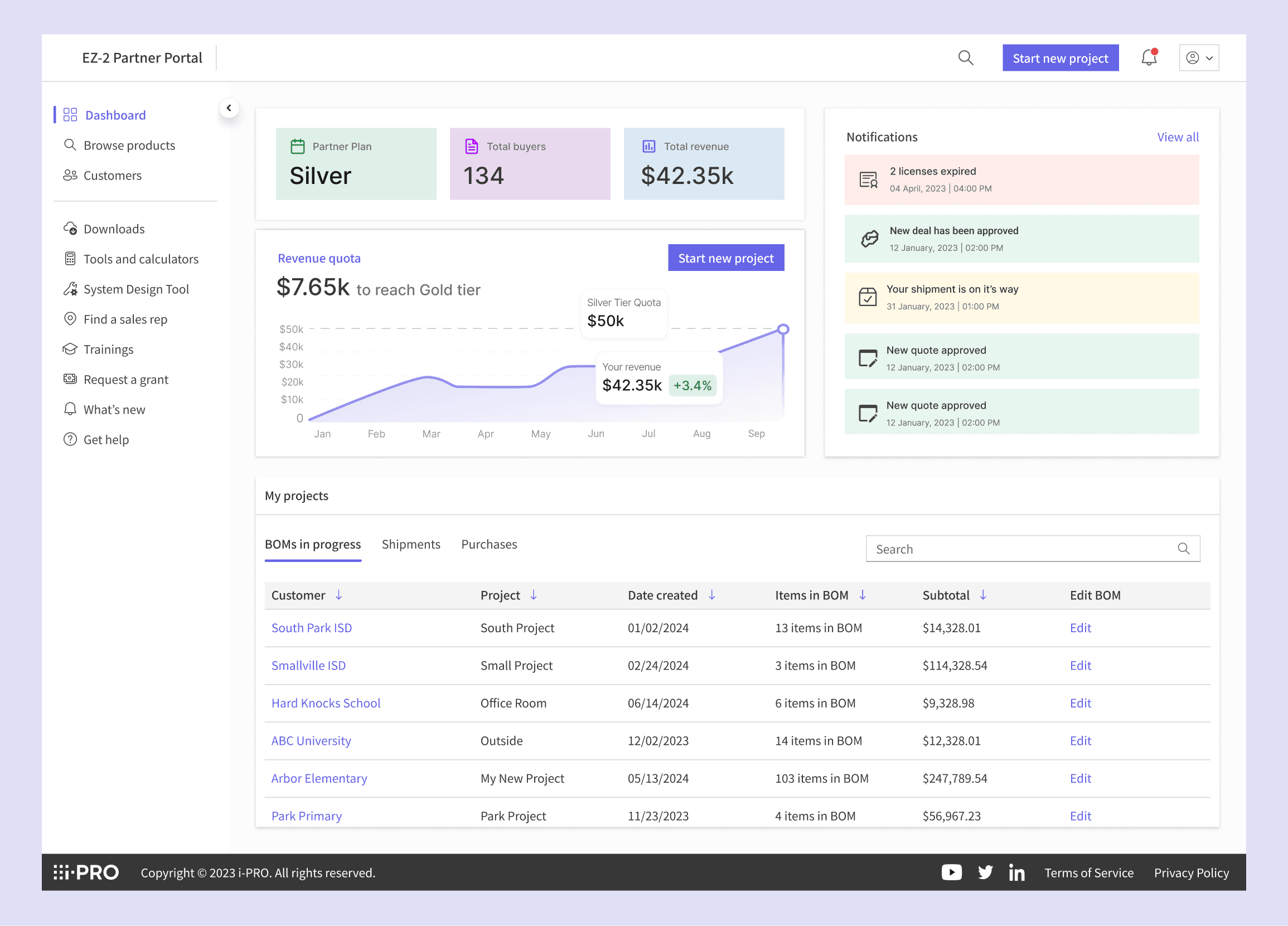
Centralized Quoting Workflow: partners can build, customize, and save drafts for specific customers in one location. This was prioritized as the most frequent and high-value user task.
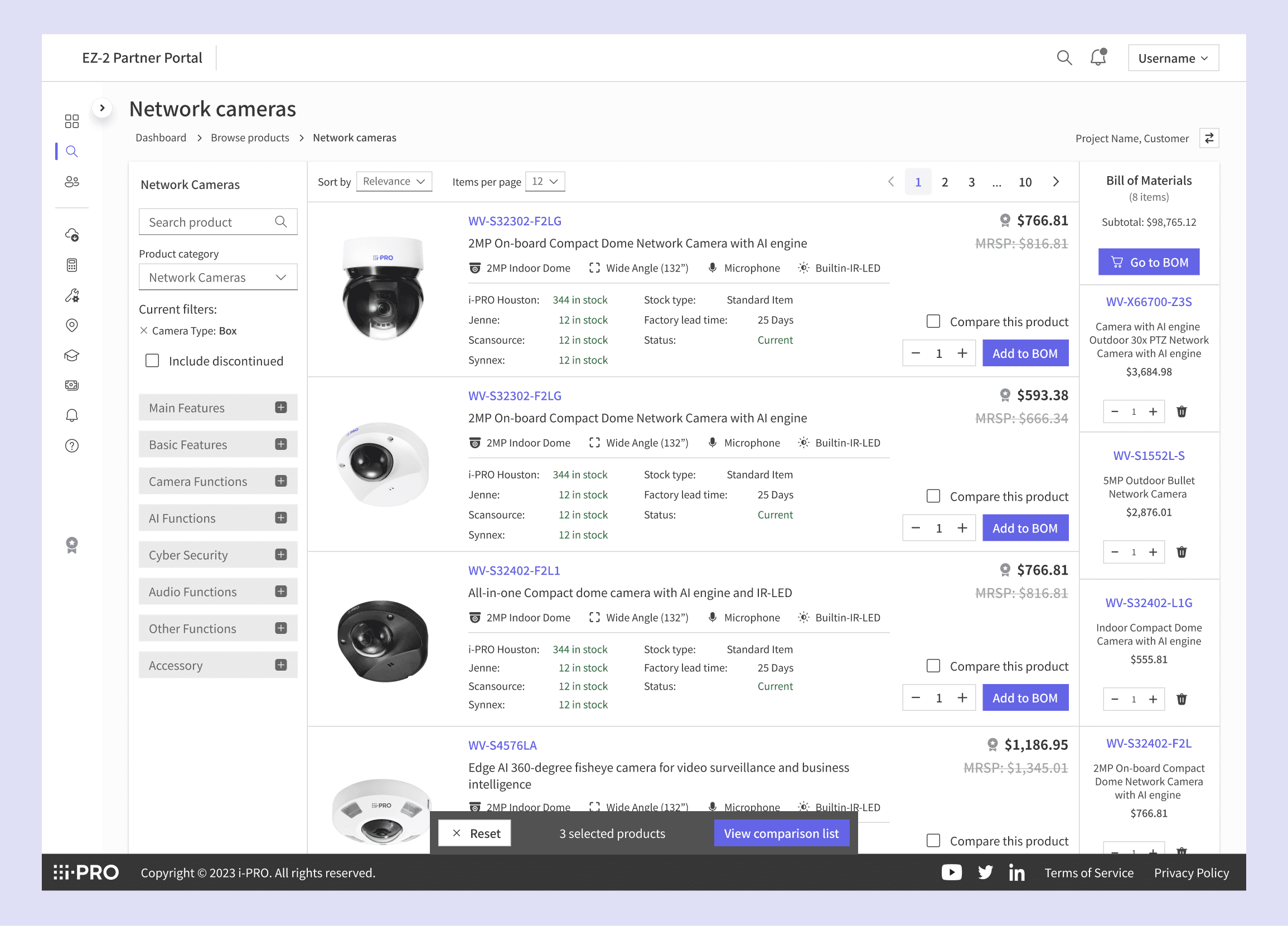
Contextual Product Discovery: unified search and category filters make products easier to find by narrowing results by type or specification.
Real-Time Data Transparency: displays live, accurate pricing and current stock data.
Key Metrics Summary: tier status and rewards, previously accessible only through support requests, are now visible on the dashboard.
"I have some TRUST ISSUES with EZ2 due to product spec discrepancies between main website and the portal.”
Quote from user interviews with an integrator

Workflow
Workflow walkthrough

Creating a quote flow
Design decisions in depth
Two decisions had the biggest impact on the project.
Search first
Search is where every partner starts, whether they're quoting, browsing, or building a BOM. If the search doesn't work, the whole process suffers. That's why I made fixing it my first priority.
If partners can't quickly find what they need, they probably won't use any of the other improvements.
Real-time pricing and trust
This was a priority I pushed for the most. The main reason partners didn't trust the portal was outdated data, so I argued for switching from cached data to live verification. Inaccurate pricing hurt trust in the platform and stopped partners from using self-service, and no amount of UI improvements could fix that.
I partnered with the backend team to build the live verification system, and together we designed a UI that updates in real time as partners use the portal. This removed the need for manual double-checks or calls to support, and became the foundation for everything else.
Concept testing
Testing focused on the two core flows: building a BOM and managing customers across projects.
Testing covered two core flows: building a BOM and managing customers across projects.
Building a BOM
BOM cart stayed visible during searches, keeping partners on track
Accessory selector eliminated the need to check outside catalogs
Real-time stock visibility helped build trust
Show tier price and MSRP side-by-side for smoother partner experience
Filter discontinued products from search and suggest compatible replacements inline
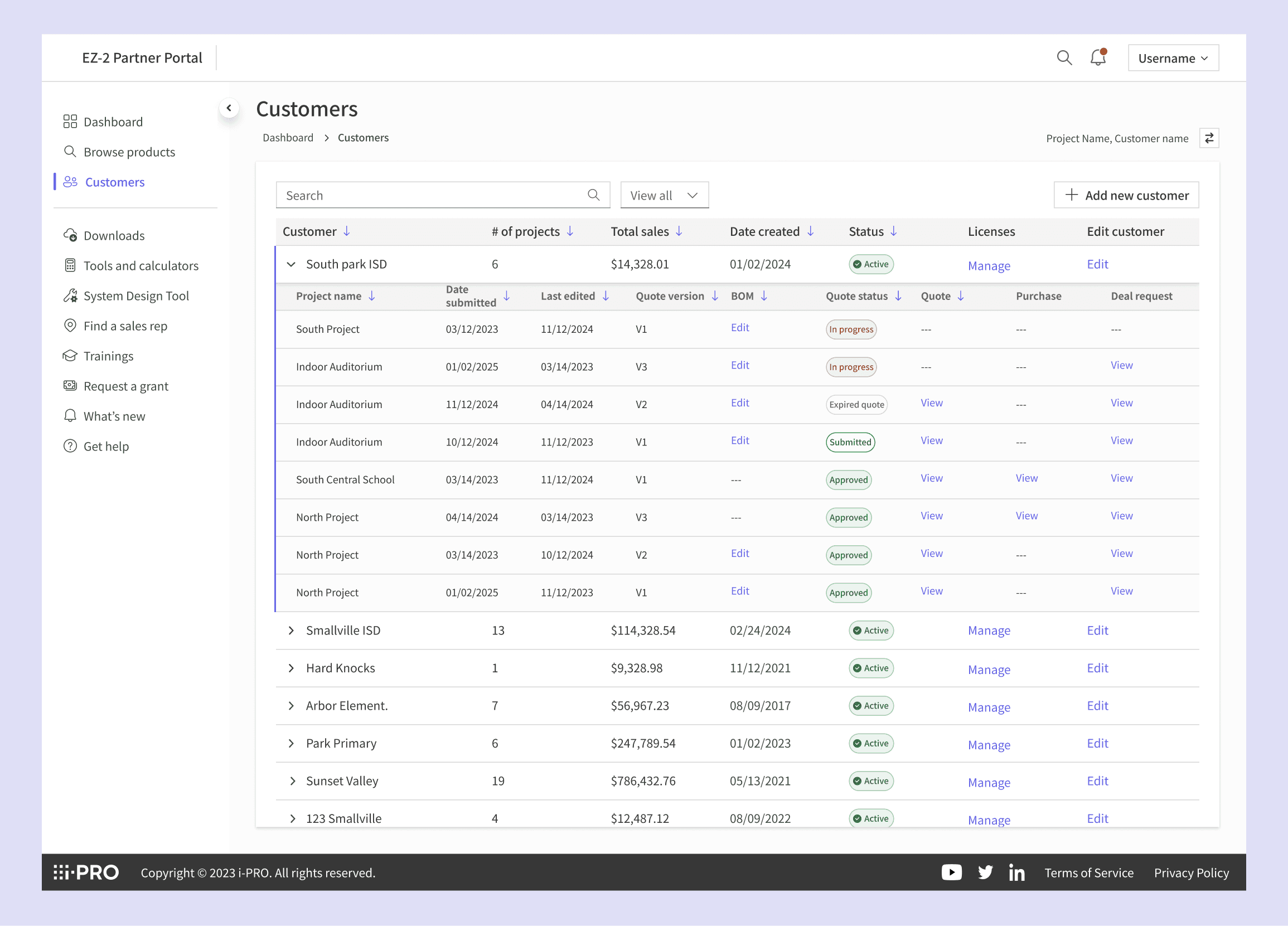
Customer & Project Management
Centralizing project, quote, and PO tracking reframed the portal as a work hub
Easy access to past projects supported repeat orders, a key revenue driver
Support multiple active projects simultaneously
Default sort by customer, not project, to reflect partners' customer-first mindset
Impact
Impact
Led design of instant quoting system. Cut quote turnaround from 2 hours to under 10 minutes
Reduced product search time by 30%
Introduced real-time pricing and inventory sync across the portal, ensuring 100% data accuracy and cutting order errors by 40%.